
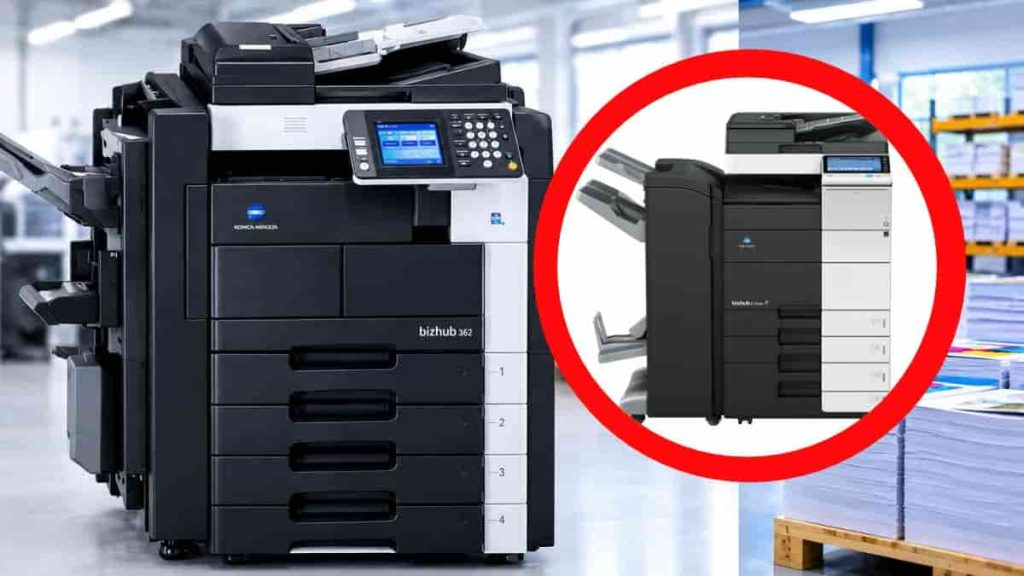
If you have been around any commercial printing press, you’ll likely see a Konica Minolta Direct Imaging (DI) printing machine. Recently, these machines are common in many printing presses. They are commonly used to produce flyers, posters, company brochures, training resources, book pages, and other marketing materials.
Among the models you may find in the market for commercial production are Konica Minolta DI 450, DI 470, DI 550 and DI 551, as well as color bizhub models such as the C450, C550, C650, C452, C552 and C652. Later generations include the C454, C554, C654, C458, C558 and C658.
The models mentioned is for you to know and identify some of them that are available in the market. I’m going to talk more about best models to buy that are more economical and easy to maintain in my future post. But know that these models differ in their capabilities, configurations and consumables.
A used DI printing machine can be a big investment, especially for a small or growing printing shop. Some of them may look inexpensive but can be very expensive to maintain. Some of them may give good quality print but not suitable for commercial bulk productions.
There are important things I want to highlight for you to know before you buy a DI machine.
When buying a Konica Minolta bizhub DI printing machine, here are 10 considerations to keep in mind.
1. Understand the Different Models and Their Capabilities
The first thing you need to know is that not all Konica Minolta DI and bizhub machines have the same capabilities.
The earlier models, such as the DI 450 and DI 550, are considered to be a different generation of machines. The C550, C650 and C450 are color multifunction machines. Various specifications, features and configurations were added to the later generations of the C-series.
This is important because buyers and sellers sometimes use the terms DI, bizhub and digital printing machine broadly, even when referring to different generations and machine types.
Make sure to know the exact model number and what it is capable of doing before purchasing.
Consider the following:
- Maximum paper size supported.
- Black-and-white or full-color printing capability.
- Print speed and production capacity.
- Supported paper weights and media types.
- Available paper trays and bypass feeding options.
- Automatic duplex printing.
- Finishing options, where supported.
- Network connectivity and print controller requirements.
For instance, a printer that mainly creates A3 flyers, brochures, book interiors, business documents and color marketing materials will have different needs to a printer that primarily prints black and white photocopies.
Do not assume that because two machines have similar model numbers, they offer the same features.
Practical tip: Ask for the specific model number and its specification sheet. Be certain of the type of jobs that you want to produce, and compare these to the machine’s actual capability.
2. Find Out Whether DI Printing Machine Will Actually Make You More Money
Buying a printing machine should be a business decision and not a simple equipment acquisition.
When deciding to buy this machine, be sure to ask yourself if it will help your company make more profit.
Consider the types of work you have been outsourcing to other printing companies. How much do you pay for them to be done for you? How often do you get such orders? Does it make sense to bring some of that production in-house to save money and shorten turnaround time?
For instance, if you always have orders for training materials, lecture notes, exam papers and business documents, but are currently outsourcing the printing, then you may be interested in finding an alternative way to print them.
Owning suitable equipment could enable you to manage production, meet deadlines more effectively and keep more of the job revenues.
However, this depends on having enough regular work to justify the investment.
Consider these questions:
- How many prints jobs that requires DI do you get per month?
- What proportion of those jobs can the machine handle?
- How much do you currently spend outsourcing?
- How much additional revenue could in-house production generate?
- Does the machine open up new avenues for business?
- Can your expected workload cover its operating expenses?
Never use your machine’s maximum advertised capacity to determine potential profit. Make estimates based on realistic customer demand.
Important thing to note: Take a look at your last 3-6 months of printing. List the jobs you can produce with the machine and calculate the amount of money that will be made and the cost of outsourcing. This will help you make a more realistic sense to determine whether the investment is worth it.
3. Know What to Inspect Before Buying a Used Direct Imaging Printer
A digital printing machine may appear clean and impressive, but it can have significant internal problems.
Have in mind that some of these models have been used for years and the service history may play a more important role than how they look on the outside.
Ask the supplier to show you the total meter reading. This will provide you with an idea of how much work the machine has done.
Use the counter however, not as the only indicator for its condition. A machine with a high meter reading that has been properly maintained may be a good choice to buy over one with a low meter reading and a history of inadequate maintenance.
Get a good technician who is familiar with the model to come and assess the machine before you buy.
Carefully check the following parts of the machine:
- Imaging units and drums.
- Developer units.
- Fuser assembly.
- Transfer belt and related components on applicable color models.
- Paper feed rollers.
- Paper registration and feeding mechanisms.
- Finishing units, if included.
Ask whether any major components have been replaced and whether the machine has experienced recurring faults.
Practical tip: Don’t be satisfied with a demonstration using just a few printed sheets! Get the machine checked by a good technician. Have the technician inspect the machine and run a reasonable test job under normal operating conditions.
4. Ensure Availability of Spare Parts and Technical Support
A machine is only a useful business asset when you can maintain it.
This is very important in the case of older Konica Minolta DI machines. Some models may no longer receive the same level of manufacturer support as newer models, so it is important to determine if replacement parts and skilled technicians are available.
Do some research about the market before purchasing.
Find out:
- Are technicians familiar with the exact model?
- Can you obtain its essential replacement parts locally?
- Are compatible consumables available?
- Can you get technical support when the machine develops a fault?
- Are there suppliers who understand the difference between the consumables used by different models?
- How long might it take to obtain a difficult-to-find component?
This should be given special consideration because a machine that needs to have a particular part brought in from far away or a specialist to come in from a very far distance and fix it can cause unnecessary delays in production.
Never depend on the seller’s promise of availability of spares. Confirm and verify this on your own.
5. Be familiar with the Toner, Developer, Drum and Consumable Requirements
The cost and availability of consumables are important considerations when operating a Konica Minolta machine.
Depending on the model, these may include black toner, color toners, drums, developer units, fuser components, transfer belts and other replacement parts.
The different models require different consumables. Although the models might look very similar, they may not have the same toners or replacement parts.
For instance, consumables are different for older monochrome DI machines and color bizhub C-series machines. Running costs can vary from a monochrome printer to a color model. A color model may require separate cyan, magenta, yellow and black toner supplies, making its running costs different from those of a monochrome machine.
Before purchasing, establish:
- The appropriate toner type and part number.The correct toner type and part numbers.
- The condition of the existing drums and developer units.
- The expected replacement requirements.
- The availability of compatible consumables.
- The cost of commonly replaced components.
- Whether the machine has been maintained with appropriate consumables.
The printing quality and the machine condition can be influenced by using inappropriate toner or poorly matched parts.
Tell the seller or technician to identify the correct consumables for the exact model. Confirm their prices and availability with independent suppliers before making payment.
6. Test the Print Quality with Real Production Jobs
Never buy a machine because the person selling it promises that it is in good working condition.
It is important to test and see its performance under the types of jobs that your company plans to produce.
Prepare a few test documents before visiting the seller.
On monochrome machines add:
- Small text and fine lines.
- Bold headings and solid black areas.
- Tables and detailed documents.
- Grayscale photographs.
For color machines, include:
- Full-color photographs.
- Gradients and color backgrounds.
- Fine text and detailed graphics.
- Solid color areas.
- Documents containing different color combinations.
Carefully examine the printed output.
Faint printing: Text and images should be sufficiently dark and readable. Unusually faint output may require investigation of the toner supply, imaging system or other components.
Lines and streaks: Repeated marks on printed pages may indicate problems with imaging, cleaning or transfer components.
Background shading: Unwanted grey or colored backgrounds should be investigated rather than dismissed as normal.
Uneven color distribution: On color machines, check whether colors appear consistent across the page.
Poor registration: Examine whether text and images align correctly, particularly on color prints.
Paper jams: Run several sheets through the machine and observe whether paper feeds smoothly. Pay attention to the trays and bypass feeder.
If you plan to print booklets, brochures or other multi-page documents, print a test of the finishing functions also, if they are part of the machine’s configuration.
A machine that produces one clean page may still develop problems during continuous printing. So be properly guided.
7. Know the Real Cost Before You Buy
Expenses are not limited to just the purchase price of the investment.
A digital printing machine should be generating sufficient revenue for the machine to run and add to your business profit.
The following costs should be taken into account when purchasing the machine:
- Machine purchase price.
- Transportation and installation.
- Toner consumption.
- Maintenance of the drum and developer.
- Replacement parts.
- Routine servicing.
- Requirements for electricity and power.
- Paper wastage.
- Operator costs.
- Finishing equipment and accessories.
The running costs between the color and monochrome machines can vary significantly. For the production of color, the four toner colors and any other applicable consumable is a factor that must be considered.
Another important thing to consider is to estimate the cost of each printed page.
If you have an order to print 2,000 copies of a training manual, paper, toner, maintenance allowance, electricity, finishing and any other relevant costs should be taken into consideration in your production cost. This will help you know what to quote the customer.
Do not calculate your selling price using paper and toner alone.. This will make a job look profitable when it’s not.
Take account of the anticipated maintenance costs of the machine. A potential cheap machine can come with a lot of repairs or replacement parts soon after purchase. So don’t just buy the machine because the amount is fair.
Tip: Make a basic cost estimate for the five most frequently jobs you normally get. Include the cost of consumables, maintenance, electricity and labor. This will help you determine whether your pricing can support the machine.
8. Will a DI Machine Handle Your Type of Printing Jobs Profitably?
A machine can have the ability to print a job, but this does not necessarily mean that it is the most appropriate or profitable machine for this job.
It’s important to take into account what type of work your customers are asking for, as well as what the machine is actually capable of.
Your printing company could process, for instance:
- A4 and A3 sized document printing.
- Lecture notes and training material.
- Flyers and posters.
- Business documents.
- Book covers and book interiors.
- Packaging, labels and brochures.
- Marketing materials.
Not every DI or bizhub model is suitable for all these jobs. Some are monochrome machines, while others offer color printing. Paper size, supported media weight, finishing capabilities and production speed also differ.
Let’s take a company that is regularly printing a thick cover for books or printing on special paper. The model used for normal office paper may not be suitable for those papers for some reason.
It’s also important to see if the machine can provide the desired quality and production that your customers are looking for at their desired volumes.
The idea is not just to have a machine that can print. It is to own equipment that can handle work your business can sell profitably.
9. Consider the Machine’s Production Capacity and Your Expected Workload
The print speed of the machine that was advertised can be attractive, especially when you are comparing different models. However, speed alone does not tell you how well the equipment will perform in your business.
Actual production depends on several factors, including paper size, paper weight, print coverage, job complexity, machine condition and the need for finishing.
A machine that performs well during a short demonstration may behave differently during a large production run.
Consider what you usually produce in a day or month.
How many sheets do you think you’ll be printing daily? Are you dealing with big orders on short deadlines on a regular basis? Is the machine going to be used daily or infrequently?
Also consider whether the equipment has the paper capacity and finishing options needed for your workflow.
If your business regularly handles multi-page documents, for example, you may need to consider how jobs will be collated, stapled, folded or bound after printing. Some finishing options are optional accessories rather than standard features.
Practical tip: Ask for a demonstration involving a reasonably sized job similar to your regular workload. Observe the feeding process, output consistency and any finishing operations you expect to use.
10. Confirm Installation, Configuration and After-Sales Support
The purchase is not complete simply because the machine has arrived at your shop.
A used Konica Minolta DI or bizhub machine may require proper installation, configuration and testing before it can become part of your regular production workflow.
Depending on the model and configuration, you may need assistance with:
- Physical installation and setup.
- Network connection.
- Computer-to-printer configuration.
- Print drivers and compatible operating systems.
- Print controller setup, where applicable.
- Paper tray configuration.
- Finishing accessories.
- Operator training.
Some machines may have optional controllers or accessories that are not included in the advertised price. Confirm exactly what comes with the machine before paying.
Inquire with the seller if the installation is included, if they offer technical support after delivery and if there is any warranty or agreed upon time frame for fixing the problems after purchase.
Be sure the machine can communicate well with the computers and software your business is using, too!
Practical tip: Prior to final payment, discuss with the seller what will be provided, who will do the installation, what accessories will be included, as well as what will be offered after sales. Obtain these facts in writing.
Buyer’s Checklist Before Making any Payment
Use this checklist when inspecting a Konica Minolta DI or bizhub machine:
- Confirm the exact model number and configuration.
- Obtain the manufacturer’s specifications or user manual.
- Check the total meter reading.
- Request the maintenance and repair history.
- Arrange an inspection by a qualified technician.
- Inspect the drums, developer and fuser.
- Check the transfer system on applicable color models.
- Confirm the correct toner types and part numbers.
- Check the availability of replacement components.
- Test print quality using different documents.
- Test the paper trays and bypass feeder.
- Check for recurring error messages and paper jams.
- Confirm computer connectivity and printing requirements.
- Test finishing functions where applicable.
- Calculate the total cost of ownership.
- Estimate whether your expected workload justifies the investment.
- Confirm installation and after-sales support.
If the seller says no to a proper inspection or demonstration, consider that as a red flag. It’s not a good idea to rush into buying a machine that you have not tested very well.
Is the DI Machine Worth Buying for a Printing Business?
Konica Minolta DI and bizhub machines can be useful equipment for businesses involved in photocopying, document production and commercial printing.
Whether a specific machine is suitable will depend on the type of work your business deals with, as well as the type and condition of the machine.
There are some machines more appropriate for common black and white document printing, while color-capable models offer additional possibilities for producing marketing materials and other commercial productions mentioned earlier above.
The age and condition of used machines matters. Do not buy a machine simply because another printing business owns one or because its advertised price appears attractive.
Above all else, think in terms of business reasons. Will the machine lower expenses for outsourcing, be able to process more orders or increase your manufacturing workflow? Are the expected income sufficient to buy and operate the building?
Avoid purchasing a machine just because another printing business is using one or because the machine is advertised at a low price.
Buy a machine that can reliably handle the work your business receives without creating unnecessary operating expenses.
Before you pay, check it, test it, verify its consumables, check the technical support and spare parts. Consider the running cost. A little investigation before purchasing can save your printing business considerable trouble later.